

Appearance
Color System
This guide explains how to customize the color scheme of Mentor LMS directly from the Admin Dashboard without requiring any code changes.
Changing Colors via Admin Dashboard
You can easily change the color system through the admin interface:
- Navigate to Dashboard → Settings → System
- Open the Style tab
- In the Custom Global Style section, you can modify the CSS variables
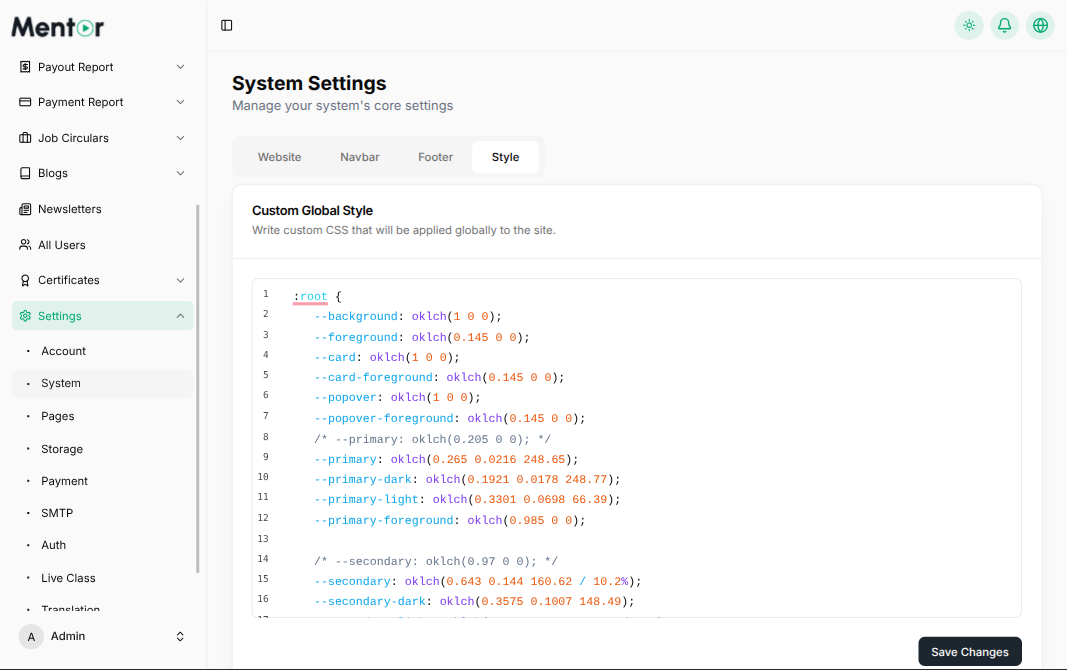
Available CSS Variables
Light Mode Variables (:root)
css
:root {
  --background: oklch(1 0 0);
  --foreground: oklch(0.145 0 0);
  --card: oklch(1 0 0);
  --card-foreground: oklch(0.145 0 0);
  --popover: oklch(1 0 0);
  --popover-foreground: oklch(0.145 0 0);
  --primary: oklch(0.265 0.0216 248.65);
  --primary-dark: oklch(0.1921 0.0178 248.77);
  --primary-light: oklch(0.3301 0.0698 66.39);
  --primary-foreground: oklch(0.985 0 0);
  --secondary: oklch(0.643 0.144 160.62 / 10.2%);
  --secondary-dark: oklch(0.3575 0.1007 148.49);
  --secondary-light: oklch(0.643 0.144 160.62 / 16%);
  --secondary-lighter: oklch(0.643 0.144 160.62 / 5%);
  --secondary-foreground: oklch(0.6468 0.144588 160.7462);
  --muted: oklch(0.97 0 0);
  --muted-light: oklch(0.9722 0.0034 247.86);
  --muted-foreground: oklch(0.556 0 0);
  --accent: oklch(0.97 0 0);
  --accent-foreground: oklch(0.205 0 0);
  --destructive: oklch(0.577 0.245 27.325);
  --destructive-foreground: oklch(0.985 0 0);
  --border: oklch(0.922 0 0);
  --input: oklch(0.922 0 0);
  --ring: oklch(0.87 0 0);
  --chart-1: oklch(0.646 0.222 41.116);
  --chart-2: oklch(0.6 0.118 184.704);
  --chart-3: oklch(0.398 0.07 227.392);
  --chart-4: oklch(0.828 0.189 84.429);
  --chart-5: oklch(0.769 0.188 70.08);
  --radius: 0.625rem;
  --sidebar: oklch(0.985 0 0);
  --sidebar-foreground: oklch(0.145 0 0);
  --sidebar-primary: oklch(0.205 0 0);
  --sidebar-primary-foreground: oklch(0.985 0 0);
  --sidebar-accent: oklch(0.97 0 0);
  --sidebar-accent-foreground: oklch(0.205 0 0);
  --sidebar-border: oklch(0.922 0 0);
  --sidebar-ring: oklch(0.87 0 0);
}
Dark Mode Variables (.dark)
css
.dark {
  --background: oklch(0.145 0 0);
  --foreground: oklch(0.985 0 0);
  --card: oklch(0.145 0 0);
  --card-foreground: oklch(0.985 0 0);
  --popover: oklch(0.145 0 0);
  --popover-foreground: oklch(0.985 0 0);
  --primary: oklch(0.985 0 0);
  --primary-foreground: oklch(0.205 0 0);
  --secondary: oklch(0.643 0.144 160.62 / 10.2%);
  --secondary-dark: oklch(0.3575 0.1007 148.49);
  --secondary-light: oklch(0.643 0.144 160.62 / 16%);
  --secondary-lighter: oklch(0.643 0.144 160.62 / 5%);
  --secondary-foreground: oklch(0.6468 0.144588 160.7462);
  --muted: oklch(0.269 0 0);
  --muted-foreground: oklch(0.708 0 0);
  --accent: oklch(0.269 0 0);
  --accent-foreground: oklch(0.985 0 0);
  --destructive: oklch(0.396 0.141 25.723);
  --destructive-foreground: oklch(0.637 0.237 25.331);
  --border: oklch(0.269 0 0);
  --input: oklch(0.269 0 0);
  --ring: oklch(0.439 0 0);
  --chart-1: oklch(0.488 0.243 264.376);
  --chart-2: oklch(0.696 0.17 162.48);
  --chart-3: oklch(0.769 0.188 70.08);
  --chart-4: oklch(0.627 0.265 303.9);
  --chart-5: oklch(0.645 0.246 16.439);
  --sidebar: oklch(0.205 0 0);
  --sidebar-foreground: oklch(0.985 0 0);
  --sidebar-primary: oklch(0.985 0 0);
  --sidebar-primary-foreground: oklch(0.985 0 0);
  --sidebar-accent: oklch(0.269 0 0);
  --sidebar-accent-foreground: oklch(0.985 0 0);
  --sidebar-border: oklch(0.269 0 0);
  --sidebar-ring: oklch(0.439 0 0);
}
Common Color Variables
Here are the most commonly used variables you might want to customize:
--primary: Main brand color (buttons, links, highlights)--secondary: Secondary accent color--background: Main background color--foreground: Main text color--card: Card and panel backgrounds--border: Border colors--muted: Muted/gray colors for less important elements--destructive: Error/danger colors (delete buttons, alerts)
The changes will take effect immediately across your entire application.
TIP
The color system uses OKLCH color space for better color consistency and accessibility. You can use online color converters to convert hex colors to OKLCH format if needed.